Customer Guide to West Pointe Bank’s Secure E-mail Service
Securely send and receive sensitive information with West Pointe Bank's encrypted email service. Use this system for documents containing account numbers, Social Security Numbers, tax ID's, financial statements, and other private data.
Sending Secure Email to West Pointe Bank
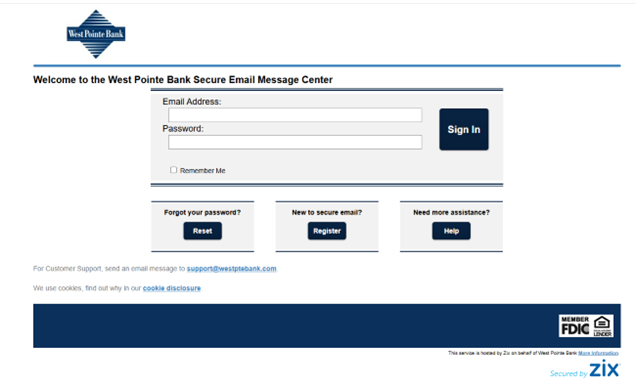
- Go to https://web1.zixmail.net/s/login?b=westptebank
- Register if you are a New User or Sign In if you have already registered.
- Follow the on-screen steps to create your secure email login.
- Once logged in, compose and send your secure message directly through the portal.
Receiving e-mails from West Pointe Bank Employees
- You'll receive an email notification when a secure message is sent to you.
- Click "Open Message."
- Sign in using your secure email credentials.
- View, reply, or download attachments safely.
File Deletion & Retention
To protect your information, files are permanently deleted 8 hours after you download them. Files that are not accessed are deleted 14 days after posting to the secure email system.
How to Unlock Your Account
If you enter your password incorrectly three times, you will receive an email notification letting you know your account has been locked. The lock will be in place for 30 minutes. At that time, you can try logging in again with your existing password, or for immediate access, follow the link and instructions provided in the email to change your password and unlock your account.
Need Help?
If you have questions or need assistance accessing your secure message, please contact your West Pointe Bank representative.

Your wallet’s new best friend.
Enjoy peace of mind with advanced fraud protection and instant access to your funds.